How to write a drum groove by tapping
Drum notation does not record pitch; it records which instrument is hit and when. Once you know where each symbol sits it is easy to read, but it is the slowest notation to write by hand. This guide covers the standard positions first, then the order for tapping a groove on an on-screen kit.
By SJ Kim (developer of Band Session Note, saxophonist) · 2026-09-16
What drum notation records
A drum staff uses five lines, but lines and spaces mean instruments, not pitches. Cymbals use X heads; drums use normal note heads.
Rhythm (note values, rests, beams) reads exactly like any other staff. Eighth-note hi-hats in 4/4 are eight eighth notes.
The five standard positions
Closed hi-hat: an X in the space above the top line. Open hi-hat adds a small circle above the X; the pedal hi-hat sits below the bottom line.
Snare: the third space from the top (between the second and third lines).
Kick (bass drum): the bottom space.
Toms: high tom in the top space, mid tom on the second line, floor tom in the second space from the bottom.
Ride: an X on top of the top line; crash: an X on the first ledger line above. These are the positions where MuseScore 4 defaults and the Percussive Notes drumset notation guidelines agree.
Why hands and feet are split
Most method books and notation programs give hand parts (hi-hat, snare, toms, cymbals) stems up and foot parts (kick, pedal hi-hat) stems down. When hi-hat and snare fall on the same beat they share one stem with two heads.
The split shows at a glance what the hands do and what the feet do. Band Session Note writes drums this way (two voices: hands and feet).
How triplet fills are written
A fill that divides a beat into three is written as three beamed eighths with a 3 above. Forcing it onto a sixteenth grid smears the rhythm, so triplets have to be judged beat by beat.
The app reads a beat as a triplet when the hits in that beat fit the triplet grid better than the sixteenth grid, and writes it as a group with a 3.
Tapping a groove step by step (app)
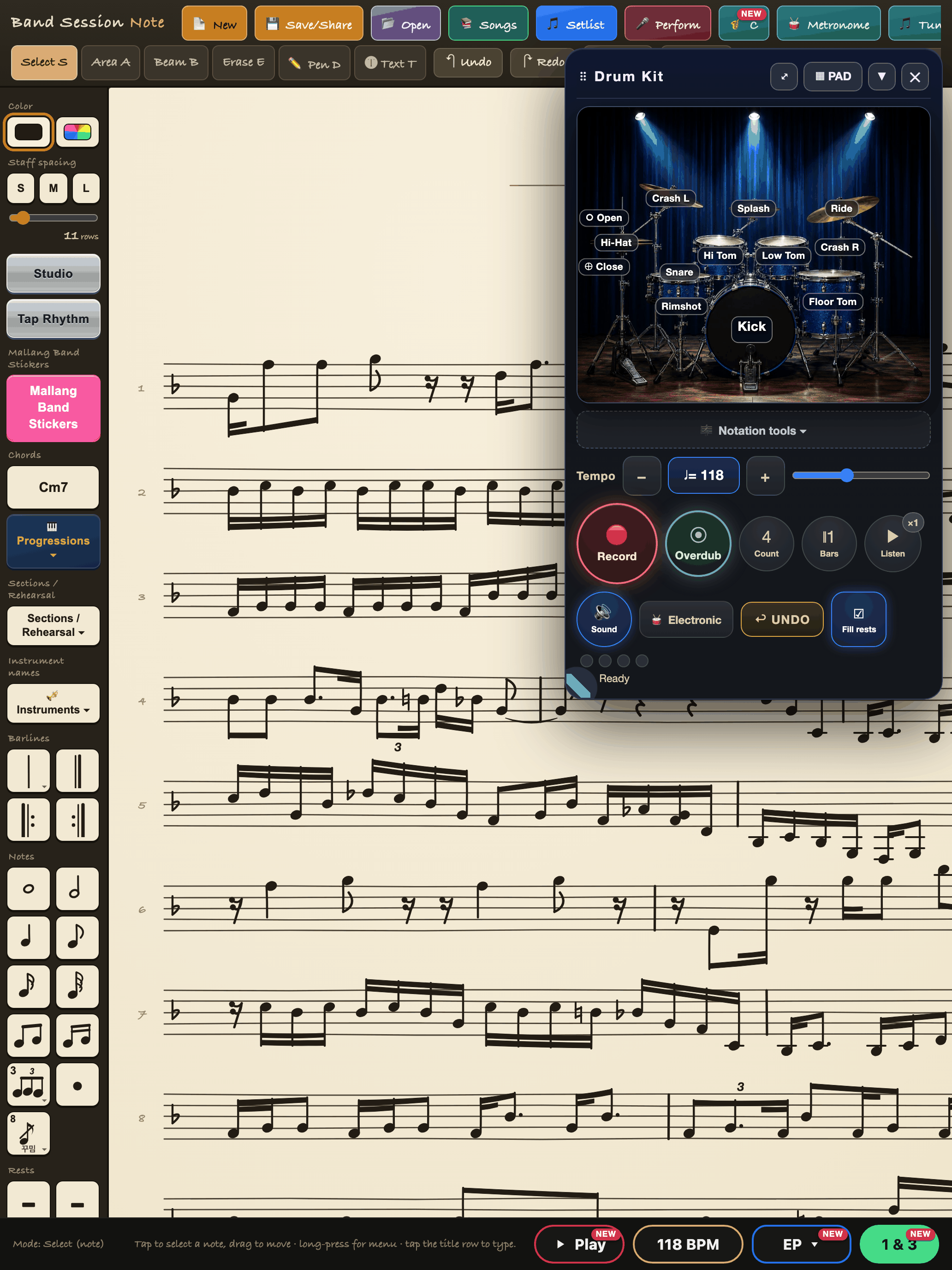
1. Tap ‘Studio Pack’ at the top and choose ‘Drum Pack’ to open the drum kit, then pick the STAGE or PAD view. Set the count-in (2, 4 or 8) and bars (1 or 2).
2. Start with the kick only. Press Record, wait for the count-in, tap the kick. When the take ends the kick line is written.
3. Press Overdub: while the bar plays back, add the hi-hat. Overdub once more for the snare. Listen after each layer; if it is wrong, undo just that layer.
4. Fills can simply be played. Triplets are grouped with a 3; everything else lands on the sixteenth grid.
5. A finished bar is made of ordinary drum notes, so you can erase hits or add more. The screen below is the actual kit panel.
FAQ
Do I need to be able to play drums?+
You only tap positions with a finger. If everything at once is hard, layer it: kick, then hi-hat, then snare with Overdub.
What if my timing is a little off?+
Hits snap to a sixteenth grid. If the hits within a beat fit a triplet grid better, that beat is read as a triplet.
Is the drum kit free?+
It is a paid pack, but you can try it 50 times with a watermark before buying, from Studio inside the app.
Try it in Band Session Note
One-time purchase · iPad and iPhone on the App Store · Android on Google Play