Turn drum rhythms into a score
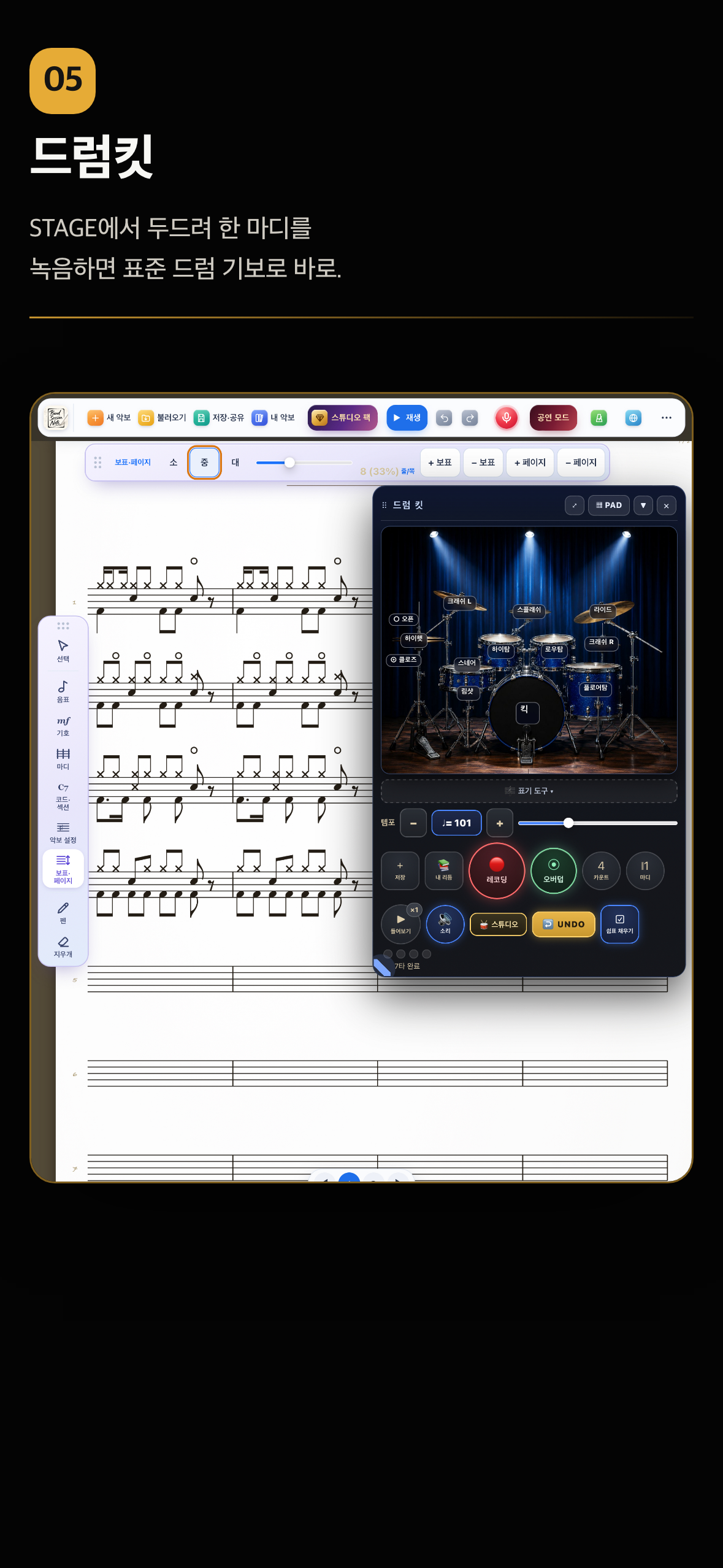
Drum parts are the hardest notation to write by hand. In BSN you tap the on-screen drum kit, and what you played is written as standard drum notation the moment the take ends. You do not have to be a drummer to hand your band a drum part.
Band Session Note is built by a working saxophonist for real rehearsals and live shows.
Sound familiar?
- •You describe a groove to the drummer out loud and it never quite lands.
- •You do not know the drum symbols - X heads, where the hi-hat sits, where the kick goes - so you never write it down.
- •Notation software makes you pick every drum hit by hand; one bar of eighths takes minutes.
- •Triplet fills are always the part you cannot figure out how to write.
How BSN solves it
You record by actually playing the on-screen kit. After the count-in you tap kick, snare, hi-hat, toms and cymbals on the STAGE view, and when the take ends that bar lands on the drum staff as standard notation. It looks identical to drum notes you place by hand, so you can mix both in one chart. The sounds are real recorded drum samples, so you can listen back and refine.
Key features
- •STAGE kit or 12 drum pads - hi-hat (closed, open, pedal), ride, crash, splash, high tom, low tom, floor tom, snare, rimshot and kick. Rearrange the pads to suit your hands and it is saved.
- •One- or two-bar patterns recorded after a count-in of 2, 4 or 8 beats.
- •Standard drum notation - hands (hi-hat, snare) stem up, feet (kick) stem down, cymbals as X heads. Recorded and hand-placed bars look the same.
- •Overdub - the last take plays back while you add hi-hat, snare or kick on top; the whole stack is written as one bar.
- •Undo and retake - discard the last take, or remove only the last layer. No need to start over.
- •Automatic triplet fills - if the hits in a beat fit a triplet grid better, that beat is written as a triplet with the 3.
- •Real recorded drum sounds - kick, snare, rimshot, three hi-hat sounds, three toms, ride and crash. Loop the bar to check it.
How to use it (5 steps)
- 1Tap Studio Pack at the top and choose Drum Pack — the drum kit opens. Pick the STAGE or PAD view.
- 2Set Count (2, 4 or 8) and Bars (1 or 2), then press Record.
- 3After the count-in, tap kick, snare and hi-hat. When the take ends it is written on the staff.
- 4Press Overdub to add another instrument while the last bar plays back. Wrong hit? Undo layer.
- 5Listen back, then move to the next bar. Fills can just be played - triplets are written automatically.
Who it is for
- •Band leaders and songwriters who want to hand the drummer a written groove
- •Drummers who want to keep a record of their own patterns
- •Teachers who teach drum notation by playing it
- •Arrangers building band charts that include a drum part
Supported devices and purchase
iPad, iPhone, and Android tablets such as Galaxy Tab. The drum kit is the Drum Pack, added from Studio inside the app. Before buying you can try it for 50 uses with a watermark, and a bundle with the Kids Music and String packs is also available.
FAQ
Do I need to be able to play drums?+
No. You only tap the kick, snare and hi-hat areas with a finger. If playing everything at once is hard, record the kick first and overdub the hi-hat and snare as separate layers.
What if my timing is a little off?+
Hits snap to a sixteenth-note grid. If the hits within a beat fit a triplet grid better, that beat is read as a triplet, so fills come out naturally.
Do I have to buy the Drum Pack?+
The drum kit is a paid pack, but you can try it for 50 uses with a watermark before buying. Purchase it from Studio inside the app; after a reinstall, Restore Purchases brings it back.
Can I edit a recorded drum bar by hand?+
Yes. A recorded bar is made of ordinary drum notes, so you can erase hits or add more. Since v1.12 recorded and hand-placed drum notation look the same.
Does transposed view change the drum part?+
No. In C, B-flat or E-flat view the drum notation stays as it is.
Start with Band Session Note today
One-time purchase on the App Store (iPad and iPhone) or Google Play (Android). The Drum Pack is added from Studio inside the app.