How to read a C chart on alto sax without transposing in your head
Most band charts arrive in concert key (C), written for keyboard and voice. Alto sax is an E-flat instrument, so it calls the same pitch by a different name - read the chart as written and the band is out of tune. This guide explains why, how the math works, and how to read without doing the math.
By SJ Kim (developer of Band Session Note, saxophonist) · 2026-09-16
Why reading a C chart as written goes wrong
Alto sax is an E-flat instrument: play a written C and the pitch that sounds is E-flat. In other words, the alto sounds a major sixth below what is written.
So when the keyboard plays a C chart and the alto reads the same chart as written, the alto comes out a major sixth low. That is the mismatch you hear.
There are two fixes: the player transposes up a major sixth in their head, or the chart itself is rewritten for alto.
The rule for each instrument
Alto sax (E-flat): read concert pitches a major sixth higher. C becomes A, F becomes D, G becomes E.
Tenor sax (B-flat): a major second higher, written an octave above that (a major ninth). C becomes D.
Trumpet, clarinet, soprano sax (B-flat): a major second higher. C becomes D.
Horn (F): a perfect fifth higher. C becomes G.
Baritone sax (E-flat) follows the alto rule, an octave lower.
How the key signature shifts
Moving up a major sixth shifts the key signature three steps toward sharps (flats are removed first, then sharps added).
Examples: concert F major (1 flat) becomes D major (2 sharps) for alto. Concert C major (no accidentals) becomes A major (3 sharps). Concert B-flat major (2 flats) becomes G major (1 sharp).
B-flat instruments shift two steps toward sharps: concert F major (1 flat) becomes G major (1 sharp) for trumpet and tenor.
Chord symbols follow the same rule. A concert Cm7 is Am7 for alto.
Three ways to read fast on stage
1. Clef trick: a long-standing alto habit - read the treble clef as if it were bass clef and fix the key signature. It takes time to learn and accidentals cause slips.
2. Make a transposed copy per song: reliable, but every edit to the original has to be done twice, and it does not help mid-rehearsal.
3. Change only the view in the app: keep the original in C and switch what you see to your key. When the original is edited, the transposed view follows, so there is no second copy to maintain.
One tap in the app
In Band Session Note, tap ‘Score setup → Transpose → Transpose (by instrument)’ in the left toolbar and pick your instrument: E-flat alto and baritone, B-flat trumpet and tenor, F horn, A clarinet, G alto flute, D trumpet, and octave up or down - 11 options.
Key signature, notes and chord names change together; the drum staff stays put. The saved score remains in concert key, and choosing C shows it as written.
Your instrument is remembered, so the chart opens in your key next time. Editing a note switches the view off so you edit in C.
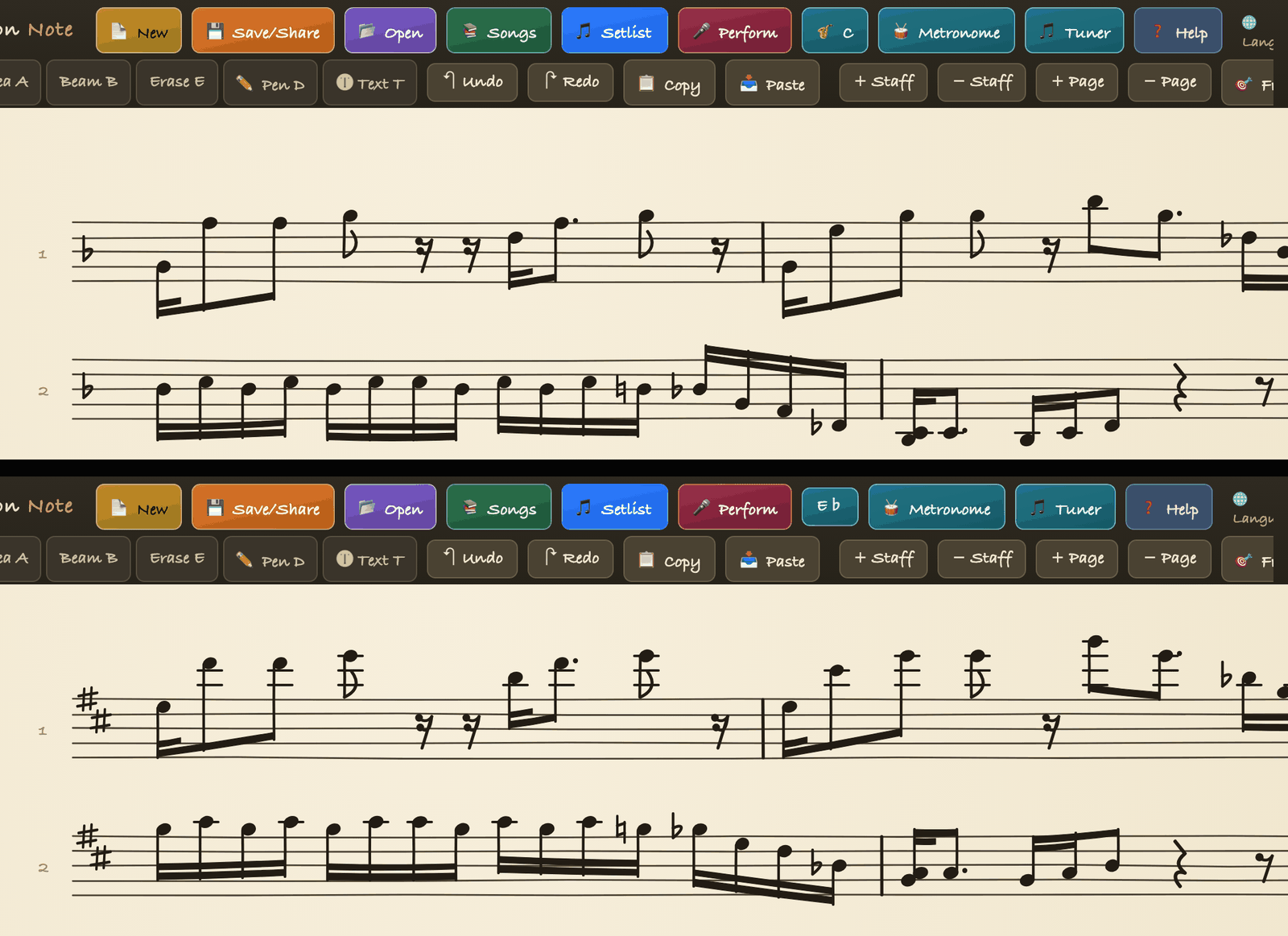
The screen below is a real example: the top is the original in F major (1 flat), the bottom is the same chart viewed for alto (E-flat) in D major (2 sharps).
FAQ
Why is tenor a major second but written an octave higher?+
Tenor is a B-flat instrument, so note names differ by a major second, but it sounds a major ninth below written pitch, so charts are written an octave higher by convention. A concert C ends up as the D an octave above on a tenor chart.
What about notes with accidentals?+
They move by the same interval. Concert B-flat is G for alto; concert F-sharp is D-sharp. The app's transposed view handles accidentals too.
Does the app transpose photo or PDF charts?+
No. Transposed view applies to scores written as notes in the app. A photo chart is an image and does not change key.
Try it in Band Session Note
One-time purchase · iPad and iPhone on the App Store · Android on Google Play