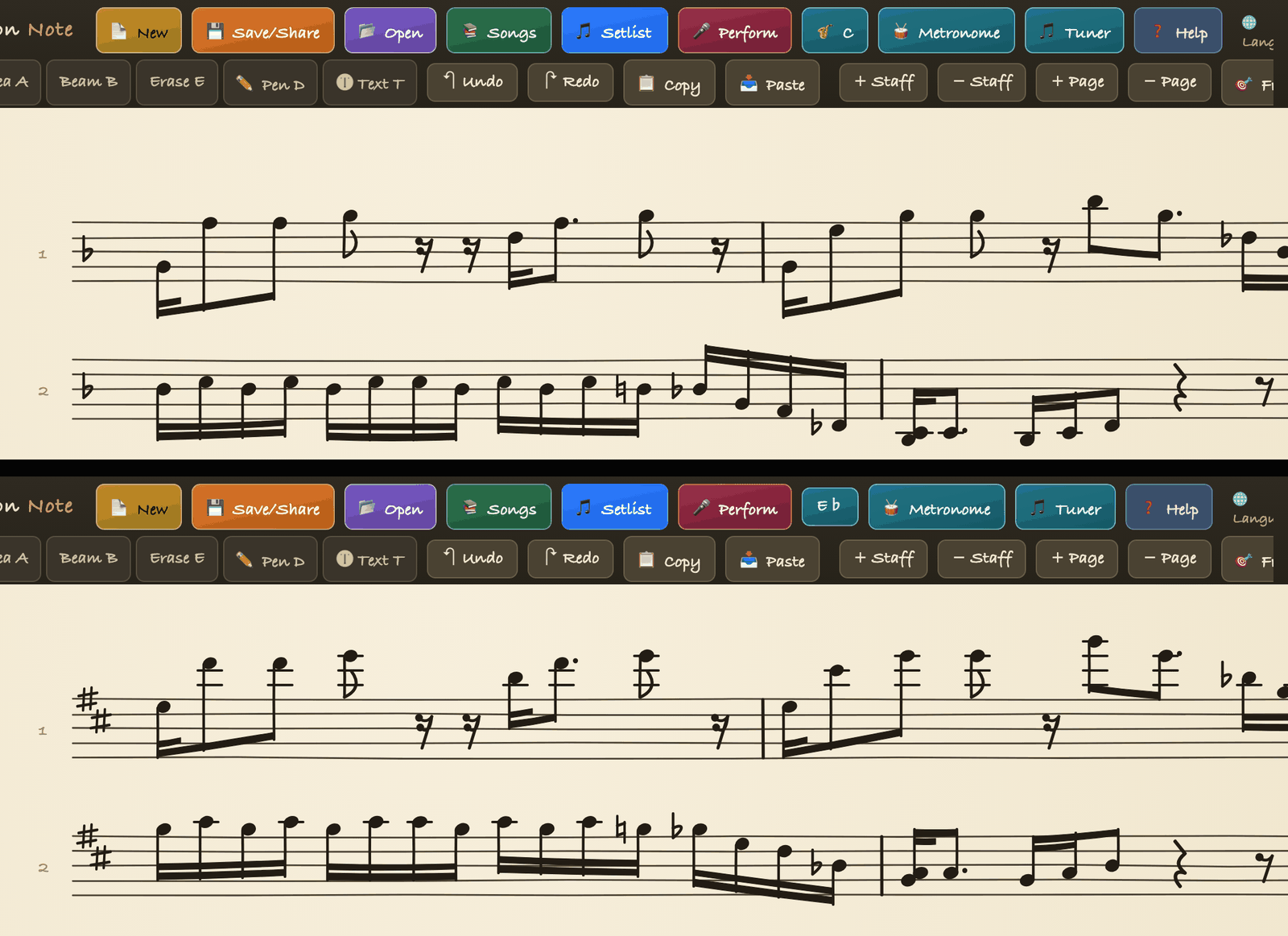
View sheet music in C, B♭ or E♭
Charts from the band usually come in concert key (C). Sax and trumpet players either transpose in their head or keep a separate transposed copy. In BSN, pick your instrument once from a list and the chart shows in your instrument's key, and the original stays exactly as it was.
Band Session Note is built by a working saxophonist for real rehearsals and live shows. Transposed view came from years of reading C charts on alto and tenor.
Sound familiar?
- •The keyboard player hands you a C chart and you read it on alto sax, adding a sixth every bar in your head.
- •You made a transposed copy, and now every edit to the original has to be done twice.
- •Trumpet, tenor and alto all want the same tune in their own key, but there is only one chart.
- •Transposing by hand means the chord names and the key signature always need fixing too, and one of them gets missed.
How BSN solves it
Transposed view changes only what you see, never the score itself. Open Score setup → Transpose in the left toolbar, tap Transpose (by instrument), pick your instrument from the list, and the key signature, notes and chord names all show in that instrument's key while the drum staff stays where it is. Your choice is remembered, so the chart opens in your key next time. Pick C again and you are back to the original.
Key features
- •11 options including C, B♭ and E♭ - B-flat trumpet, clarinet and soprano sax; B-flat tenor sax and bass clarinet; E-flat alto; E-flat baritone; F horn and English horn; A clarinet; G alto flute; D trumpet; octave up (piccolo) and octave down (bass, guitar).
- •The original stays - the saved score remains in concert key; only the display changes. Choose C to see it as written.
- •Key signature, notes and chords together - the key signature changes, notes move, and chord names show in the new key.
- •Drums stay put - the drum staff is not transposed.
- •Remembered - your instrument key is saved and used the next time you open the app.
- •Edit in concert pitch - editing a note while transposed switches the view off so you edit in C. Switching keys is one undo step.
How to use it (4 steps)
- 1With a score open, tap Score setup → Transpose → Transpose (by instrument) in the left toolbar. You can also tap the mic button and say “transpose”.
- 2Pick your instrument from the list, for example E♭ alto sax.
- 3The key signature, notes and chords now show in that key. The button reads E♭.
- 4To see the original again, tap the button and choose C.
Who it is for
- •Sax, trumpet and clarinet players who receive concert-key charts
- •Teachers and band leaders who coach several horn parts from one chart
- •Bands that want to maintain a single chart for everyone
- •Piccolo, bass and guitar players who read an octave up or down
Supported devices
iPad, iPhone, and Android tablets such as Galaxy Tab. Transposed view is a built-in feature with no extra purchase.
FAQ
Does transposing change my original score?+
No. The saved score stays in concert key; only what is displayed changes. Choose C again and it looks as written.
Do the chord names and key signature change too?+
Yes. The key signature switches to the instrument's key, the notes move, and chord names are shown in that key. Only the drum staff stays as it is.
Are there instruments beyond alto, tenor and trumpet?+
Yes. F horn and English horn, A clarinet, G alto flute, D trumpet, and octave up (piccolo) or down (bass, guitar) - 11 options in all.
Can I edit notes while in transposed view?+
Editing a note switches the view off and you edit in concert pitch (C). Pick your instrument key again when you are done.
Does it transpose photo or PDF scores?+
No. Transposed view applies to scores written as notes in the app. Photo and PDF scores are images and do not change key.
Start with Band Session Note today
One-time purchase on the App Store (iPad and iPhone) or Google Play (Android). Transposed view is built in.