How to turn sheet music pages during a live performance
If you have ever lost a beat turning a page on stage, the problem was the page turn, not your playing. BSN performance mode fills the screen with the score, turns pages by tap, swipe or foot pedal, shows the next line before you need it, and even counts your rest bars for you.
Band Session Note is built by a working saxophonist for real rehearsals and live shows. The page turns and countdown came from problems met on stage.
Sound familiar?
- •You miss the first line every time the page turns.
- •Both hands are on the instrument and there is no hand left to turn.
- •You lose count during a 16-bar rest and miss your entry.
- •When a song ends you scroll around the tablet on stage looking for the next chart.
- •The white screen is blinding on a dark stage, and a stray touch shoves the score sideways.
How BSN solves it
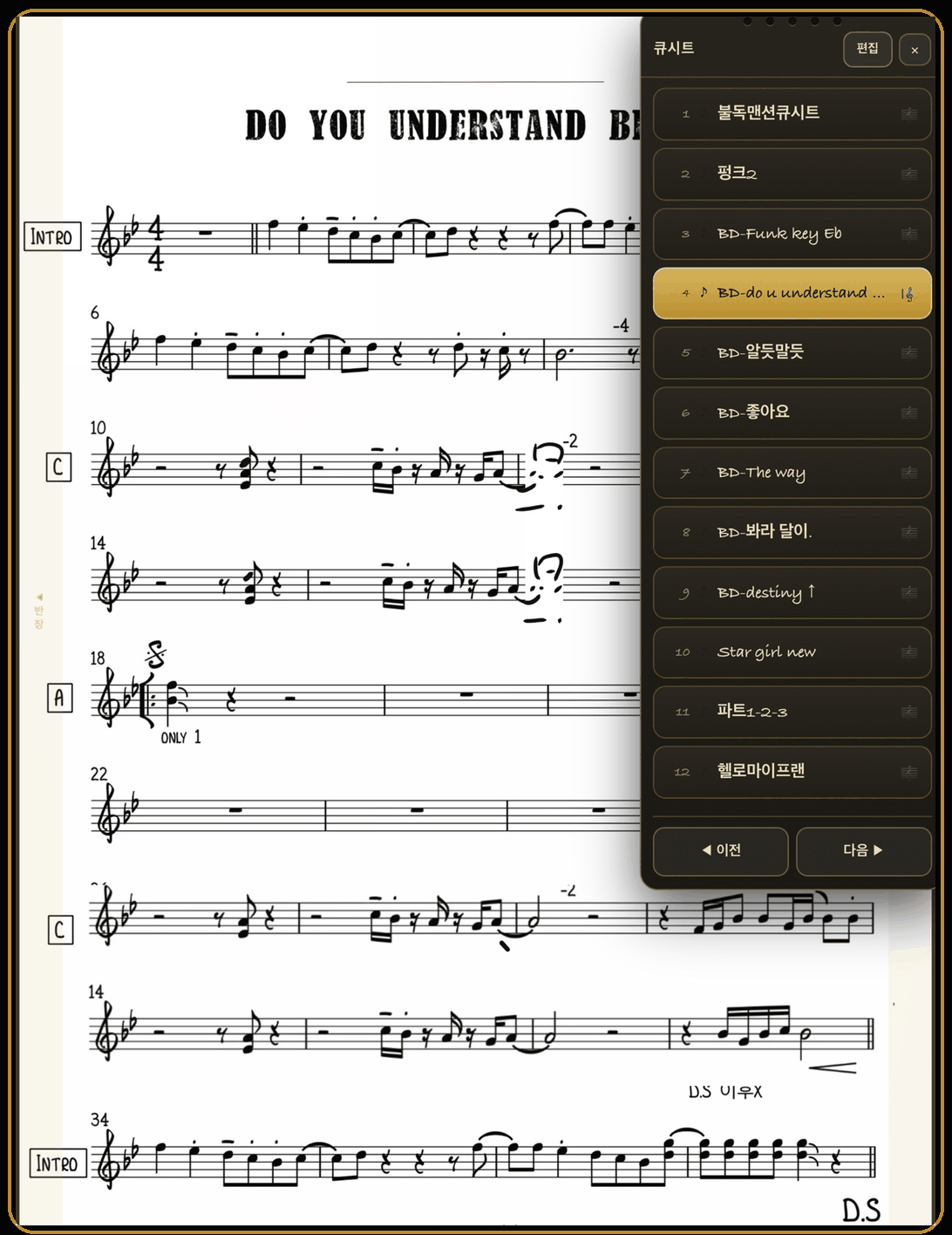
Tap Performance at the top and the editing tools disappear; the whole screen becomes the score. Turn pages by tapping the left or right side, swiping sideways, or pressing a Bluetooth foot pedal. Turn on half-page view and each turn moves half a page, so the staff you were just reading stays at the top while the first line of the next page slides in early. Drop a countdown on a rest and the screen counts the bars and shows "go". The bottom bar gives you dark background, brightness, auto-scroll, screen lock and the setlist.
Key features
- •Full-page or half-page turns - tap the page number to switch. Half-page turns show the first line of the next page early.
- •Three ways to turn - tap the left or right side, swipe sideways, or use a Bluetooth foot pedal.
- •Bluetooth foot pedal - any pedal that works as a keyboard (arrow, Page Up/Down or space keys) turns pages with no setup.
- •Performance countdown - place it on a rest and the screen counts the bars and shows "go". Drag the number to reposition, tap to cancel.
- •Multi-bar rests - a thick bar with a number fills the measure; long-press to change the bar count.
- •Follow bars - highlights the current bar in time with the metronome, and can start together with the countdown (needs barlines).
- •Bottom bar - dark background, brightness, auto-scroll, screen lock (so a stray touch cannot move the score), setlist.
- •Setlist and cue sheet - put the show in order in a setlist (share it or export as PDF), then build a cue sheet from the song list in one tap. On stage, open the cue sheet and move between songs with Prev and Next.
How to use it (5 steps)
- 1Open a score and tap Performance at the top. The score goes fullscreen.
- 2Tap the page number in the bottom bar to choose Full or ½ page turns.
- 3Tap the right side of the screen or swipe to turn. Use the pedal if you have one.
- 4For long rests, place a Countdown on that spot in edit mode. On stage the screen counts for you.
- 5When the song ends, open the cue sheet from Setlist in the bottom bar and tap Next.
Who it is for
- •Wind, guitar and keyboard players whose hands are on the instrument
- •Horn sections and backing vocalists with long rests
- •Bands that play a whole set in order
- •Anyone reading from a tablet on a dark stage
Supported devices
iPad, iPhone, and Android tablets such as Galaxy Tab. Pair a keyboard-style Bluetooth pedal with the device for hands-free turns. Performance mode is built in with no extra purchase.
FAQ
Which foot pedals work?+
Any Bluetooth pedal that acts as a keyboard and sends arrow, Page Up/Down or space keys. Pair it in the device's Bluetooth settings, open performance mode, and it turns pages right away.
When is half-page view useful?+
When you tend to lose the first line at a page turn. Half-page turns keep the staff you were just reading at the top of the screen while the first line of the next page slides in early.
Does performance mode work with photo or PDF scores?+
Yes. Turning, half-page view, dark background and lock all work. Only bar following needs barlines, so draw them over an imported score if you want it.
Can a stray touch move the score?+
Turn on the lock in the bottom bar. Palms and fingers then cannot move the score; only tap turns and the pedal respond.
How do I get to the next song mid-show?+
Build a setlist and a cue sheet beforehand. In performance mode, open the cue sheet and use Prev and Next to move between songs. The cue sheet opens as a stage-friendly notepad.
Start with Band Session Note today
One-time purchase on the App Store (iPad and iPhone) or Google Play (Android). Performance mode is built in.